7 Home Office Desk Upgrades That Make a Real Difference
Working from a laptop at the kitchen table gets old fast. The screen sits too low, there's never a free port, and video calls look and sound worse than they should. Small upgrades fix most of that without buying a new computer.
The seven picks below each solve one common problem: posture, ports, video, audio, charging, lighting and typing. Start with whichever one bothers you most.
The picks
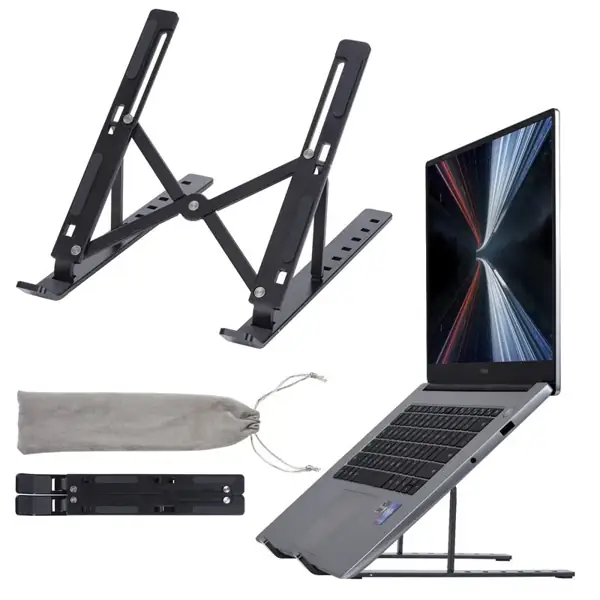
1. Aluminum Alloy Laptop Stand, 6-Speed Height Adjustable for MacBook Pro
$31.99 · Free US shipping on orders $35+
Raises the laptop screen closer to eye level, which helps with neck strain on long days. Six height settings, an aluminum build with a non-slip silicone base and an open design for airflow. Fits 11 to 17 inch laptops and folds flat.
View product →
2. 7-in-1 USB-C Hub with 100W PD, 10Gbps USB-C and 4 Ports for Laptops
$39.49 · Free US shipping
Adds the ports a thin laptop is missing, including a 10Gbps USB-C port, and passes up to 100W of power through so you can charge while it's plugged in. Aluminum housing.
View product →
3. Full HD 1080P Webcam with Microphone, 30fps, 5ft USB Cable
$23.49 · Free US shipping on orders $35+
A simple upgrade over a built-in laptop camera: 1080p at 30fps with a built-in mic, plug-and-play over USB on Windows, Mac and Linux, and a 5ft braided cable. Works with Zoom, Teams and Skype.
View product →
4. 1080P 60FPS USB Webcam with Auto Focus, Adjustable 60-95° FOV
$48.49 · Free US shipping
If you're on camera a lot, this one adds autofocus, 60fps video and a field of view you can switch between 60, 75 and 95 degrees in software, plus a noise-canceling mic.
View product →
5. Mpow Wireless Headset with Microphone, 13-Hour Talk Time for Office, Call Center & Driving
$43.49 · Free US shipping
A single-ear Bluetooth headset with a mic for calls, rated for up to 13 hours of talk time. Memory foam ear pad and physical volume buttons; it recharges in about 2 hours.
View product →
6. Orico 8-in-1 GaN Desktop Charging Station, 4 Outlets, 2 USB-C, 2 USB-A
$43.49 · Free US shipping
Four AC outlets plus two USB-C and two USB-A ports in one station with surge protection. The 5ft cord and flat 45° plug help when the outlet is behind the desk.
View product →
7. 24W Double-Head LED Desk Lamp, 5 Color Modes with USB Charging Port for Home Office
$68.99 · Free US shipping
Two lamp heads light a wider area of the desk. Five brightness levels and five color temperatures from 3,200K to 6,500K, touch controls that remember your setting, and a USB charging port.
View product →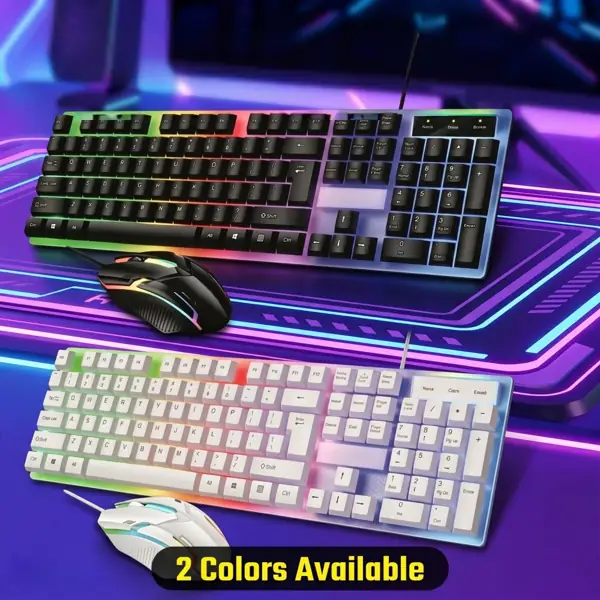
8. Backlit Mechanical-Feel Keyboard & Mouse Combo, 104-Key Wired USB
$49.99 · Free US shipping
A full-size 104-key backlit keyboard with a mechanical feel and a matching mouse with adjustable DPI. Wired USB, no drivers, spill-resistant.
View product →Buying tips
- Fix the screen height first.
- If you look down at a laptop all day, a stand plus a separate keyboard and mouse is usually the biggest comfort upgrade for the money.
- Count your ports before buying a hub.
- List what you plug in daily (monitor, drive, mouse receiver, charger) and make sure the hub covers it. If the hub has power passthrough, plug your laptop charger into it.
- Light your face, not the screen.
- For video calls, put light in front of you rather than behind. A window behind you turns you into a silhouette, even with a better webcam.
- Webcam frame rate.
- 30fps is fine for meetings. 60fps and autofocus help if you move around, demo things on camera or stream.
- Check the charging station's watts.
- The station above lists 25W for its USB charging, which is good for phones and accessories. A laptop usually needs its own charger.
- Warm light in the evening.
- Most desk lamps let you pick a color temperature. A cooler setting (around 6,500K) is good for focused work; a warmer one (around 3,200K) is easier on the eyes at night.
Orders of $35 or more ship free in the US, and every order has 30-day returns.
Browse everything in Computer & Desk.